Cloud gaming is changing how people enjoy video games, making it possible to experience exciting titles without purchasing expensive gaming computers or downloading large files. JioGames brings this experience closer to Indian players by offering a platform where you can explore and stream games across supported devices. Whether you enjoy action adventures, racing challenges, sports simulations, or casual entertainment, cloud gaming provides a convenient way to discover something new.
With JioGames, you can access a growing collection of games through an internet connection and compatible devices. Instead of depending entirely on powerful local hardware, you can stream supported titles and start playing with less installation work. The platform also offers features related to game discovery and entertainment, making it useful for beginners and experienced players who want more flexibility.
What Is JioGames?
JioGames is an Indian gaming platform that brings online gaming and cloud-based experiences together. It allows users to discover different gaming categories and access supported titles through compatible devices. Its cloud gaming service is particularly useful for people who want to enjoy PC and console-style experiences without investing in expensive gaming hardware.
The platform focuses on making gaming more accessible by reducing the need for traditional installations. Depending on the available game and subscription, you can stream selected titles using a smartphone, laptop, or compatible television. This approach gives players more flexibility and makes it easier to explore different types of games without filling their devices with large installation files.
sourecs: jiogames.com
What Is JioGames Cloud Gaming?
Cloud gaming is a technology that runs video games on remote servers instead of relying entirely on your personal device. The game is processed in a data center, while video and audio are streamed to your screen through the internet. Your controller, keyboard, mouse, or touchscreen sends commands back to the server, allowing you to interact with the game.
JioGames Cloud uses this technology to provide access to supported games without requiring traditional downloads. This can be especially helpful when your smartphone or laptop does not have enough storage or powerful hardware to run demanding games. However, a reliable internet connection is important because streaming quality, response time, and overall performance depend heavily on network conditions.
Key Features of JioGames
The platform combines different gaming experiences in one place, helping users discover entertainment without switching between multiple services. Its features are designed to make gaming more convenient across supported devices, whether you prefer playing alone or exploring competitive entertainment.
- Cloud gaming for accessing supported titles through streaming.
- Multiple game categories, including action, adventure, racing, and sports.
- Compatibility with selected smartphones, laptops, and smart TVs.
- Different control options, including touchscreens and compatible controllers.
- Game discovery features for exploring new releases and popular titles.
- Gaming-related entertainment and esports content.
Another useful advantage is the flexibility of playing across different screen sizes. You can enjoy a mobile gaming session while travelling or use a larger television for a more immersive experience at home. Actual features and compatibility can vary depending on your device, location, and the service currently available.
JioGames List of Games: What Can You Play?
Game selection is an important consideration when choosing a cloud gaming service. JioGames offers access to different genres, allowing players with different interests to explore its available library. Whether you prefer competitive challenges or relaxing entertainment, browsing the game collection can help you find experiences that match your playing style.
- Action games featuring combat, missions, and exciting challenges.
- Adventure games focused on exploration and storytelling.
- Racing games featuring vehicles, tracks, and competitions.
- Sports games covering cricket and other sporting experiences.
- Strategy games that require planning and decision-making.
- Casual games designed for shorter and more relaxed sessions.
Some titles highlighted in JioGames’ promotional material include Mafia II, Tomb Raider, For Honor, and Cricket 26. However, game availability can change, and certain titles may require specific subscriptions or ownership arrangements. Check the official game library before purchasing a pass or expecting a particular title to be available.
How to Sign Up for JioGames
Getting started is relatively straightforward if you have a compatible device and access to the official platform. Registration allows you to explore available features and check which gaming experiences are accessible through your account. Before creating an account, make sure you are using the genuine website or official application.
- Visit the official JioGames website at jiogames.com.
- Explore the available gaming services and select the option you want to use.
- Enter your mobile number if registration is requested.
- Complete the verification process using the instructions provided.
- Sign in to your account and explore the available games.
- Check subscription requirements before launching premium titles.
Some services may require additional verification or an eligible subscription. Registration requirements can also differ depending on the product you choose. Always review the current instructions displayed on the official website rather than relying on outdated tutorials.
How to Download and Install the JioGames App or APK
If you prefer gaming through a smartphone, the official Android application provides another way to explore the platform. You can search for JioGames on Google Play and check the developer information, application details, and compatibility before installing it.
- Open Google Play Store on your smartphone.
- Search for JioGames.
- Select the official application.
- Review its permissions and compatibility information.
- Tap Install and wait for the process to finish.
- Open the application and follow the sign-in instructions.
You may also find APK files on third-party websites, but downloading applications from unofficial sources can expose your device to modified or unsafe software. Using the official app store is generally the safer choice. Keep your application updated to benefit from available improvements and security fixes.
How to Play PC Games With JioGames
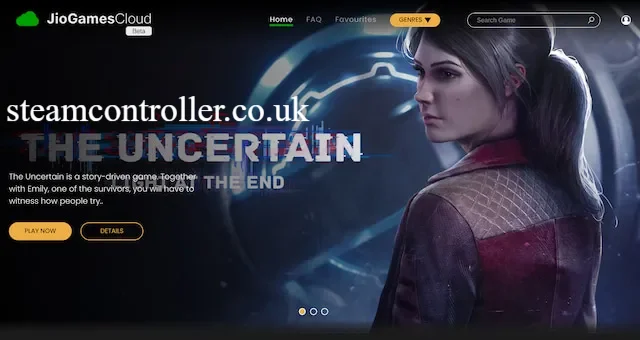
Cloud gaming can make PC-style experiences accessible without requiring a high-end gaming computer. Instead of installing demanding games locally, users can stream supported titles through compatible devices and a suitable internet connection. This approach can be helpful for casual players who want to explore more demanding games without upgrading their computers.
Before starting, check whether your preferred title supports your device and chosen access plan. Some games work better with a keyboard and mouse, while others are more comfortable with a controller. A stable network connection, an updated browser or application, and compatible input devices can help improve your overall experience.
JioGames Cloud Pricing in India: Is It Free?
Pricing is an important factor when deciding whether cloud gaming is worth trying. JioGames may provide different access options, including promotional offers and subscription-based passes. The available price can depend on the selected plan, subscription duration, and current promotions.
The following prices appeared in the supplied search information and should be treated as indicative rather than guaranteed current rates.
| Plan | Reported price | Duration |
| Mobile Pass | ₹111 | 56 days |
| Pro Pass | ₹398 | 28 days |
Before purchasing, visit the official website to confirm the latest pricing, benefits, supported devices, and game access. Also check whether a subscription includes all games or only selected titles. Comparing the available plans can help you avoid paying for features you do not need.
Is JioGames Worth Buying for Your Kids?
Gaming can provide entertainment, encourage problem-solving, and introduce children to interactive digital experiences. However, parents should consider the type of games available, their age ratings, subscription costs, and the amount of time children spend playing. A gaming platform can be useful for family entertainment when access is managed responsibly.
- Check age ratings and game descriptions before allowing access.
- Set reasonable daily screen-time limits.
- Monitor online interactions and multiplayer features.
- Review subscription charges and payment settings.
- Encourage breaks and balance gaming with outdoor activities.
- Choose games that match your child’s age and interests.
Parents should also review the platform’s current privacy and account settings. Cloud gaming can be convenient, but it still requires appropriate supervision, especially when children use online services or communicate with other players.
Advantages and Disadvantages of JioGames
Cloud gaming offers several benefits, but it also comes with limitations that users should understand before subscribing. Your experience may depend on internet quality, game availability, device compatibility, and the subscription you choose.
| Advantages | Disadvantages |
| No need to download large supported games | Requires a stable internet connection |
| Reduces dependence on expensive hardware | Streaming may introduce input delay |
| Supports multiple device types | Not every game supports every device |
| Provides access to different genres | Subscription costs may apply |
| Saves local storage space | Performance can vary with network quality |
The biggest benefit is convenience, especially for users who want to explore demanding games without purchasing a dedicated gaming PC. However, players with unstable internet connections may experience buffering or reduced visual quality. Understanding these trade-offs helps you decide whether cloud gaming matches your expectations.
JioGames vs Traditional Gaming Platforms
Traditional gaming usually requires users to download or install games directly onto their devices. This gives players more control over local files and can provide excellent performance when the hardware meets the game’s requirements. However, large installations and expensive upgrades can make traditional gaming less convenient.
Cloud gaming takes a different approach by running supported games remotely and streaming the experience to your device. This reduces local storage requirements and can make demanding games accessible on less powerful hardware. The main difference is internet dependency: traditional gaming can often continue offline, while cloud streaming needs a reliable connection throughout the session.
Troubleshooting Common JioGames Problems
Like other online gaming services, cloud gaming can sometimes experience technical problems. Games may take longer to load, streams may become blurry, or users may encounter account and application errors. Fortunately, checking a few basic settings can resolve many common issues.
- Check your internet connection before launching a game.
- Restart your router if streaming becomes unstable.
- Close unnecessary applications that consume bandwidth.
- Update the official application or supported browser.
- Restart your device if the platform stops responding.
- Check your account and subscription status.
- Confirm that your device meets the game’s requirements.
If the issue continues, consult the official support resources. Providing details about your device, internet connection, and error message can make it easier to identify the problem.
Conclusion
Cloud gaming is creating new opportunities for people who want to enjoy modern games without purchasing expensive hardware or downloading large files. JioGames brings together game discovery, cloud streaming, and different entertainment options, making it an interesting choice for players exploring flexible gaming experiences in India.
Before getting started, check the supported devices, available game library, internet requirements, and subscription prices. If your connection is reliable and your preferred games are available, cloud gaming can offer a convenient alternative to traditional installations. Comparing the available plans and trying the service before committing to a longer subscription can help you make a better decision.
Frequently Asked Questions
What is JioGames, and how does it work?
It is a gaming platform that provides access to online games and cloud gaming experiences through compatible devices and an internet connection.
Is JioGames free to play?
Some experiences may be free, while selected cloud games and premium features may require a paid subscription.
What is JioGames Cloud?
It is a cloud gaming service that streams supported games from remote servers without requiring traditional game installations.
How do I sign up for JioGames?
Visit the official website or download the official application, enter your mobile number if requested, and complete the verification process.
Can I play JioGames on a PC?
Yes, supported cloud gaming experiences can be accessed on compatible PCs through the available platform or supported browser.
Does JioGames Cloud support Genshin Impact?
Game availability can change, so check the official JioGames Cloud library to confirm whether Genshin Impact is currently supported.
Where can I find the latest JioGames list of games?
Visit jiogames.com and browse the official gaming library for currently available titles and new releases.
Is JioGames worth buying for my kids?
It can be a convenient entertainment option, but parents should review game ratings, subscription costs, online safety, and screen-time limits before purchasing.
Also Read